Showing posts with label 3D. Show all posts

5/20/2011

Spiral Stairs Maze


Made up entirely of concentric spiral stairways, this is an idea that's been rattling around in my brain for a while. Each staircase is made of 12 steps, and the circles have 2, 3, 4, and 6 staircases going out from the center. Where the tops of each staircase meet and there is a doorway, you can pass between the circles. There is also an option to make the walls invisible so you can see the whole maze from outside.

To solve, download the Sketchup model and click "Walkthrough", which will set the optimal eye height and field of view for walking through the maze. Use the Walk tool and push the arrow keys to walk, and the Look Around tool to see more from one place. Start at one of the doorways at the bottom of the tower, and try to get to the top. If you find that too hard, click "Skeleton view" to make the walls invisible. Some tips for solving: explode all the components and mark your way with paint, or use scenes as you walk through. You will need Google Sketchup.

10/16/2010

Rhombicosidodecahedron Maze


What, you ask, is a rhombicosidodecahedron? It's a complex polyhedron that combines perfect triangles, squares, and pentagons, and has several interesting mathematical properties. This is actually a "small rhombicosidodecahedron", and I've decided it's my favorite polyhedron. It shares properties with the dodecahedron, the icosahedron, and the rhombic triacontahedron, among others. Here is the maze: 3D Warehouse model


To solve, use Google Sketchup to rotate the maze. Start at the top and try to get to the bottom. I'll upload the solution after someone attempts it. This is similar to my Cube Maze because you have to orbit it to follow the pathways, but doesn't have any tunnels or holes, so it should be more doable. All of the triangles, squares, and pentagons are made from the same three components, which keeps the file size small. These components can be moved or rotated, which changes the maze. This is actually the third version, and the only one to connect all the pathways with a challenging solution. A helpful tip for solving is to explode all the components (right click -> explode), and then use the paint bucket tool to mark the pathways as you go.

12/09/2009

Five-Level Maze Solution

Here is a simple video of the solution to my Five-Level Walk-through Maze. I had to re-solve it because I didn't remember the way. It can be done! There are also other solutions, I think. The maze can only be solved by traversing each level multiple times, and by "jumping down" at certain places (a one-way trip). To see the solution in more detail, download the animation from Google Warehouse, and push play.

9/20/2008

Island Abbey Maze


My new maze was pretty fun to make. I was trying to use the design I used for the Chain-mail maze to make a 3D creation, and this is what it turned into. I think I'm getting better at using Sketchup, by using more of its features and designing reusable components to simplify and keep the file size small. Unfortunately, this maze is so hard with the curved passageways that even I can't do it without taking it apart. If it helps, move the top half to the side so you can solve by tracing the path from above and below without going through the passageways.


Anyone who likes classic TV or just anything weirdly funny but clean and entertaining should check out episodes of The Addams Family on Hulu.com and The Twilight Zone on CBS.com. These are my new favorite shows. I also like the Beverly Hillbillies, but I haven't found it online anywhere.

9/16/2008

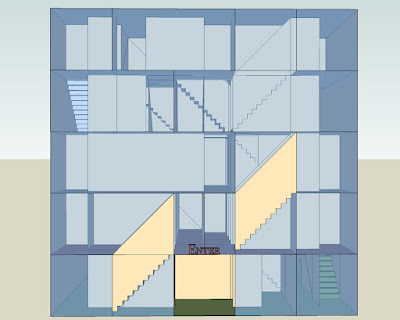
Five-Level Walkthrough Maze


Go up and down stairs to reach the roof of the building. This is a maze you have to walk through to solve, so dowload it from 3D Warehouse.

To walk: Click the Camera >Walk tool (looks like a pair of footprints) and use the arrow keys to go forward, back, and turn left or right. First click on the ground where you want to walk. Pay attention to eye height (should be between 3-5 feet for stairs to work, 4 is ideal), field of view (works best between 40 and 80 degrees), and distance from the camera (keep it close). I've set it up so these things should be ok to start with. As you walk, you can stop and use the Look Around tool to look in any direction. 

Other Tips: Be careful about jumping down where there are no stairs. It may be difficult to get back. Then again, it may be necessary to solve the puzzle. Don't try starting at the end because it won't work. Click Scene 1 to start over. Pay attention to the color of the floor. I made the outer walls transparent so you can "cheat" and look in to get an idea of how the maze works, but you won't be able to solve the whole maze that way.


8/25/2008

Cube Maze


This insane thing was very fun to make, but I don't know if anyone will actually attempt it. You have to download the Sketchup model for this one, because you have to be able to rotate the cube and look through the tunnels. I made the sides translucent and color-coded the tunnels to make it more doable. It's tricky, but extremely cool if I say so myself.

Here's an animation of the solution. The music is just something I was humming, which I thought sounded cubish. The yellow dot in the center of the video follows the correct path.

7/26/2008

3D Hedge Maze

My newest favorite toy: Google Sketchup. Fun, easy (once you get the hang of things), and free. I've been toying with different ways to draw mazes using this program, and finally decided to go with the old-fashioned hedge maze to start with. I've been to several of these in Europe, and they're extremely fun to run around in, play hide-and-seek, or just explore. Here's my take on an old idea, with over- and under-passes of course!


Go to the center first, and then find your way out to the other side. Remember, you can only go up and down stairs that are connected by a bridge or tunnel, and no climbing over hedge walls! I put little benches in to rest when you get tired. 

If you want to walk through this maze and see it from all angles, download Sketchup or Sketchup Viewer and have a blast. Here's the simplest file, and a more complex one with textures and other features, like a fountain and a tree. (I didn't make the tree, but imported it from 3D Warehouse).


This little video shows one possible route you could take through the maze.


I am also updating my older posts, adding solutions and making sure all the links work so you can see the large-sized pictures if you want.

3/01/2005

Easter Egg

Yes, this was drawn directly on an egg while the rest of my family was using normal Easter egg dye. I made a page on my other site that lets you turn the egg around with a little javascript, which I haven't gotten to work on this site yet.


Solution